

- VeeCard
- Price
- Blog
- F&Q
Introducing Auto-Stamp: Automated Loyalty Stamping for Busy Businesses
When your business is busy, every second counts. Whether you're serving coffee during the morning rush, helping customers at the checkout counter, or managing a high-volume service environment, your staff should be focused on delivering great customer experiences—not repeatedly issuing loyalty stamps. That's why we built Auto-Stamp—a feature that lets merchants turn a smartphone or tablet into an easy self-service loyalty stamping station.
What Is Auto-Stamp?
Auto-Stamp is an optional feature available for Stamp Cards (called Loyalty Cards in the VeeCard App).
The traditional loyalty workflow works like this:
- A new customer scans the merchant's QR code.
- The customer registers through a web page.
- The customer receives a loyalty card and can save it to Apple Wallet or Google Wallet.
- During future visits, a staff member manually scans the customer's loyalty card QR code to issue a stamp.
This workflow works well, but during busy periods, staff need to stop serving customers to complete every stamp.
Auto-Stamp card improves the stamping process.
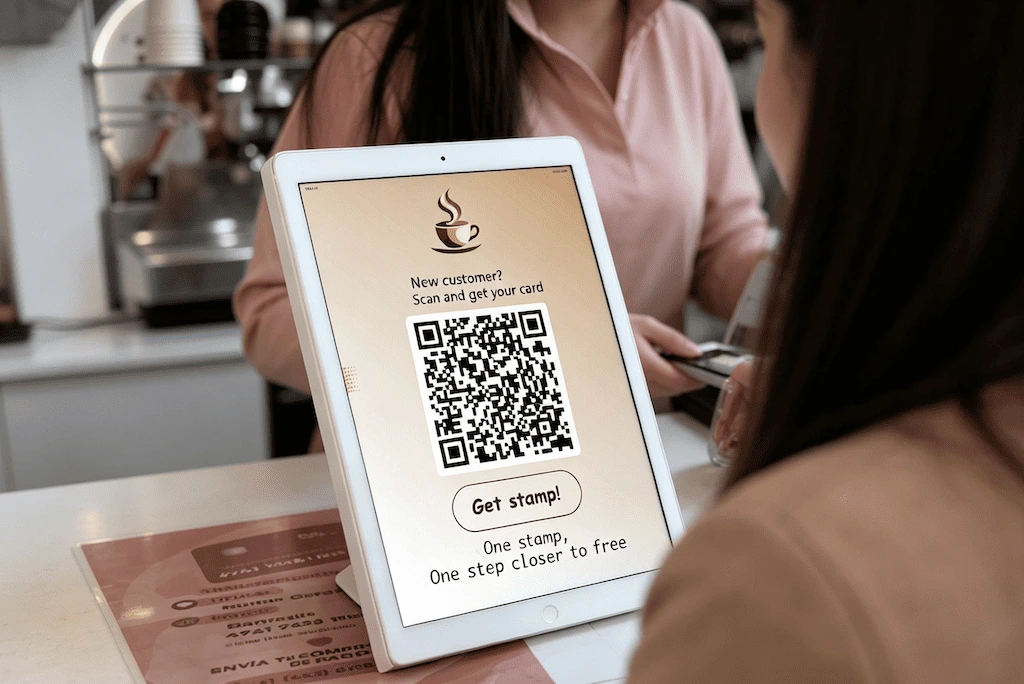
A merchant simply opens Auto-Stamp mode on a smartphone or tablet running the VeeCard App and places it where customers can access it.
When a customer visits:
- The customer taps the Get Stamp area on the Auto-Stamp page.
- The built-in VeeCard Scanner opens automatically.
- The customer presents their loyalty card QR code from Apple Wallet or Google Wallet.
- The visit is verified automatically.
- A loyalty stamp is added instantly.
The QR code displayed on the Auto-Stamp page is used only for new customer registration. Existing customers do not use this QR code to receive stamps.
Auto-Stamp currently supports Stamp Cards only. Membership Cards, Tier Cards, and Prepaid Cards are not supported because these card types often require different business rules or manual verification.
Why Use Auto-Stamp?
Manual stamping requires staff involvement for every customer visit.
A staff member needs to:
- Open the VeeCard App.
- Scan the customer's loyalty card QR code.
- Complete the stamp process.
- Continue serving the next customer.
For businesses with frequent repeat customers, these small actions add up quickly.
Auto-Stamp allows merchants to place a smartphone or tablet running the VeeCard App at the counter and let customers complete the stamping process themselves.
The benefits include:
- Faster customer flow.
- Less interruption for staff.
- A smoother loyalty experience.
- Consistent stamp verification.
- No additional hardware required.
Any suitable smartphone or tablet can become an Auto-Stamp kiosk simply by running VeeCard App in Auto-Stamp mode.
When Should You Use Auto-Stamp?
Auto-Stamp works best for businesses with straightforward loyalty programs where customers earn rewards based on visits.
It is an excellent fit for:
- Coffee shops
- Restaurants
- Retail stores
- Gyms
- Salons and spas
- Other businesses with frequent customer visits
Auto-Stamp is especially useful when:
- Staff are busy during peak hours.
- Customers frequently return for simple rewards.
- The loyalty rule is mainly "one visit = one stamp".
For loyalty programs involving more complex decisions, manual stamping remains recommended.
Examples include:
- Birthday Rewards
- Referral Rewards
- Instant Rewards
- Special promotions requiring staff approval
Auto-Stamp is an automation tool for repetitive visits—not a replacement for every loyalty interaction.
What You'll Need
Before enabling Auto-Stamp, make sure you have:
- The VeeCard App installed.
- At least one active Stamp Card / Loyalty Card Design.
- A smartphone or tablet to run Auto-Stamp mode.
- A stable internet connection.
For the best experience, we recommend:
- Keeping the device plugged in during business hours.
- Preventing the screen from sleeping.
- Disabling battery optimization for the VeeCard App.
- Keeping the VeeCard App running during business hours.
- Placing the device somewhere customers can easily access.
How Auto-Stamp Works
For Merchants
Setting up Auto-Stamp only takes a few minutes.
- Open Business → Auto-Stamp Settings in the VeeCard App.
- Turn Auto-Stamp on.
- Select the Loyalty Card you want to use.
- Create a 4-digit Admin Lock Code.
- Configure the Stamp Cooldown.
- Optionally upload a custom background image.
- Tap Open Auto-Stamp.
The smartphone or tablet now enters Auto-Stamp mode.
The Auto-Stamp page displays:
- A New Customer QR Code for customer registration.
- A dotted Tap Area.
- A Get Stamp button inside the Tap Area.
Customers can tap anywhere inside the dotted Tap Area to open the built-in VeeCard Scanner.
Once the scanner opens, customers can present their wallet card QR code and receive their stamp automatically.
Exiting Auto-Stamp Mode
To prevent accidental exits, Auto-Stamp is protected by the Admin Lock Code.
To exit Auto-Stamp mode:
- Double-click the New Customer QR Code.
- Enter the 4-digit Admin Lock Code.
- The VeeCard App exits Auto-Stamp mode.
This ensures customers cannot accidentally close the Auto-Stamp page during business hours.
For Customers
Auto-Stamp does not require customers to install an app.
Customers only need their loyalty card saved in Apple Wallet or Google Wallet.
Existing Customers
To receive a stamp:
- Open the loyalty card in Apple Wallet or Google Wallet.
- Tap the Get Stamp area on the merchant's Auto-Stamp screen.
- The VeeCard Scanner opens automatically.
- Place the loyalty card QR code inside the camera viewfinder.
- The visit is verified.
- The stamp is added automatically.
The loyalty card updates immediately after a successful stamp.
New Customers
The QR code displayed on the Auto-Stamp page is for new customer registration.
A first-time customer can:
- Scan the merchant QR code using their smartphone camera.
- Open the registration web page.
- Create their loyalty card.
- Save the card to Apple Wallet or Google Wallet.
After registration, no automatic stamp is awarded.
This helps prevent abuse through repeated account creation.
For new customers, merchants can provide a separate Welcome Stamp or first-visit reward if desired.
Customizing the Auto-Stamp Page
Merchants can customize the Auto-Stamp page by uploading a background image.
Before uploading a custom background, the default page displays:
- The New Customer QR Code.
- A dotted Tap Area.
- The Get Stamp button.
Customers can tap anywhere inside the dotted Tap Area to open the VeeCard Scanner.
After uploading a custom background:
- The Get Stamp button is hidden.
- The dotted Tap Area is hidden.
- The New Customer QR Code remains visible.
The Tap Area remains active even though it is no longer visible.
Therefore, merchants should design their custom background with a clear button or call-to-action placed inside the original Tap Area.
For example:
- "Tap to Get Stamp"
- "Stamp Me"
- "Collect Your Stamp"
This keeps the customer experience clear while allowing merchants to fully customize the appearance.
Camera Source
By default, Auto-Stamp uses the front camera of the merchant's smartphone or tablet when the VeeCard Scanner opens.
For most modern devices, this provides the most convenient experience because customers can easily see themselves positioning their wallet QR code within the camera viewfinder.
However, some older smartphones and tablets have front cameras that were designed primarily for selfies and do not support autofocus. As a result, the QR code may appear blurry, making it difficult or impossible for the VeeCard Scanner to recognize it.
If you experience slow or unsuccessful scans, try changing the Camera Source in Auto-Stamp Settings from Front to Rear.
The rear camera typically has a higher-quality sensor and autofocus, allowing it to capture sharp QR codes and provide faster, more reliable scanning.
Tip: If customers frequently experience scanning failures or need to move their wallet card unusually close or far from the device, switching to the rear camera usually resolves the issue.
Which Camera Should You Use?
| Camera Source | Recommended For |
|---|---|
| Front Camera (Default) | Most modern smartphones and tablets with autofocus. Provides the most convenient customer experience. |
| Rear Camera | Older devices whose front camera cannot autofocus or produces blurry QR code images. Recommended when scan reliability is more important than convenience. |
Understanding Stamp Cooldown
The Stamp Cooldown defines the minimum time required between two successful stamps from the same customer.
For example, if the cooldown is set to 8 hours:
- A customer receives a stamp at 9:00 AM.
- The customer cannot receive another Auto-Stamp until 5:00 PM.
This prevents duplicate stamps while ensuring loyalty rewards remain fair.
The cooldown is calculated based on the customer's last successful visit.
Merchants can configure the cooldown based on their loyalty program rules.
Testing Auto-Stamp
For testing purposes, merchants can temporarily set the Stamp Cooldown to 0 hours.
This allows repeated scans during setup without waiting for the cooldown period.
However, 0-hour cooldown should only be used for testing and should not be used for official business operation.
For production use, merchants should configure a cooldown that matches their actual loyalty rules.
Features Disabled While Auto-Stamp Is Enabled
Because Auto-Stamp is designed for simple automated stamping, features requiring manual verification are automatically disabled.
These include:
- Referral Rewards
- Birthday Rewards
- Instant Rewards
These features require human judgment and cannot be fully automated.
If your loyalty program depends on these features, manual stamping remains the recommended workflow.
Understanding Auto-Stamp's Security
Auto-Stamp improves security by keeping the stamping process connected to an actual customer visit.
Unlike systems where customers independently scan a permanent merchant QR code, Auto-Stamp requires:
- A customer-presented loyalty card QR code.
- Verification through the VeeCard App scanner.
- Cooldown validation before issuing a stamp.
This helps prevent:
- Sharing a merchant QR code remotely.
- Collecting stamps without presenting a valid loyalty card.
- Duplicate stamps within the cooldown period.
However, no automated system can eliminate every possible misuse scenario.
For high-value rewards, special promotions, or redemption-based offers, merchants should continue using manual verification when needed.
Perfect for High-Traffic Businesses
Auto-Stamp is designed for businesses where speed matters.
Imagine a busy coffee shop during the morning rush.
Instead of every customer waiting for staff to manually issue a stamp, customers simply tap the Auto-Stamp screen, scan their wallet card, and continue their visit.
Staff stay focused on preparing orders and serving customers.
The same experience works well for:
- Restaurants
- Retail stores
- Gyms
- Salons
- Other businesses with frequent repeat visits
Start Automating Your Loyalty Program
Auto-Stamp makes loyalty stamping faster, simpler, and easier to manage.
By turning an existing smartphone or tablet into an Auto-Stamp kiosk through the VeeCard App, merchants can reduce repetitive work while giving customers a smoother loyalty experience.
If your business uses simple visit-based Loyalty Cards, Auto-Stamp is a practical way to modernize your loyalty program without adding extra hardware.
Open Business → Auto-Stamp Settings in the VeeCard App today, tap Open Auto-Stamp, and start creating a faster loyalty experience for your customers.
Grow Your Business with VeeCard
VeeCard helps cafés, restaurants, salons, gyms, and retail stores create digital loyalty cards that customers can save directly to Apple Wallet and Google Wallet.
Start your free trial today and discover how Auto-Stamp can help you automate your loyalty program.
More posts

Why Loyalty Programs Work Better Than Coupons

Customer Retention vs Customer Acquisition: Which Matters More?
Why Every Small Business Needs a Digital Loyalty Card Program
How QR Code Loyalty Cards Work (No App Required)

Beyond the Points: Designing Loyalty Programs that Drive Emotional Engagement

The Silent Shift: How Digital Loyalty is Becoming the Operating System for Main Street Everywhere

A 2025 Data Analysis: Are Local Businesses Winning the Loyalty War Against Big Chains?
The Psychology Behind Scratch Cards: Why Customers Love Them

Boosting Salon Loyalty: How Digital Stamp Cards Increase Booking Frequency